Thursday, April 9th 2026
How to Animate Old Photos with AI Agents Using MCP Server & Agent Skill
Posted by
Animate Old Photos now works directly with AI agents — you can animate old photos and turn them into AI-generated videos without leaving your AI tool. There are two integration options: an MCP Server that works with any MCP-compatible client, and an Agent Skill for agents that have shell/terminal access. Both let you bring old photos to life by simply describing what you want in a chat message.
This guide covers everything you need to set up either option, from getting your API key to running your first animation.
What You Need Before Getting Started
Before you begin, make sure you have:
- An Animate Old Photos account — sign up here if you don't have one yet.
- An API key (also called Access Code) — generate one from Profile > API Key.
- Credits — each animation costs 3 credits. Purchase credits from the pricing page.
- For MCP Server: any MCP-compatible AI tool (Cursor, Claude Desktop, Claude Code, Windsurf, Cline, etc.)
- For Agent Skill: an AI agent with terminal access, plus
curlandjqinstalled in your shell.
How to Get Your API Key
- Go to Animate Old Photos and sign in to your account.
- Click on your avatar in the top-right corner of the page.
- In the dropdown menu, click Apply for API.
- Click "Create Access Code", give it a name (e.g., "My MCP"), and copy the generated code.
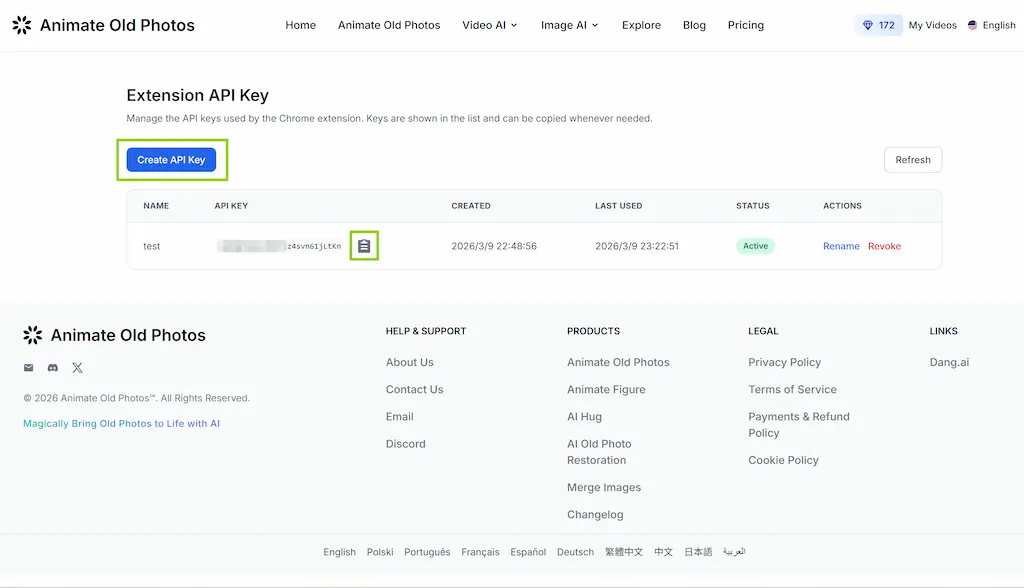
Important: The access code is shown only once upon creation. Copy and save it securely. If you lose it, you can create a new one and revoke the old one.
Connect the Animate Old Photos MCP Server
MCP (Model Context Protocol) is an open standard that lets AI agents call external tools. The Animate Old Photos MCP server gives any MCP-compatible client three tools to animate photos, check credits, and poll task status.
MCP Endpoint:
https://animateoldphotos.org/api/mcp
Pick your AI tool below and add the configuration.
Cursor
Create or edit .cursor/mcp.json in your project root (or add it in Cursor Settings > MCP):
{
  "mcpServers": {
    "animate-old-photos": {
      "url": "https://animateoldphotos.org/api/mcp"
    }
  }
}
Claude Desktop
Edit your claude_desktop_config.json (find it via Claude Desktop > Settings > Developer):
{
  "mcpServers": {
    "animate-old-photos": {
      "url": "https://animateoldphotos.org/api/mcp"
    }
  }
}
Claude Code
Run this command in your terminal:
claude mcp add animate-old-photos https://animateoldphotos.org/api/mcp
Windsurf
Open Windsurf Settings > MCP and add a new server with:
- Name:
animate-old-photos - Server URL:
https://animateoldphotos.org/api/mcp - Transport: Streamable HTTP
Other MCP Clients
For any other MCP-compatible client (Cline, Continue, etc.), point a Streamable HTTP transport to:
https://animateoldphotos.org/api/mcp
No authentication headers are required at the transport level — each tool call includes the API key as a parameter.
Available MCP Tools
Once connected, your AI agent will have access to three tools:
| Tool | What It Does | Required Parameters |
|---|---|---|
check_credits | Check your remaining credit balance | api_key |
animate_photo | Submit a photo for animation (returns a task ID) | api_key, image_url |
get_task_status | Poll an animation task until the video is ready | api_key, task_id, dnt, did |
animate_photoaccepts an optionalpromptparameter to describe the desired motion (e.g., "gentle smile with a slight head tilt").get_task_statusshould be called every 30 seconds. Whenstatus >= 99, theresourcefield contains the video download URL.
Example: Animate a Photo with MCP
Once the MCP server is connected, just tell your AI agent what you want:
You: Animate this photo using my API key
aop_xxxx. The image is athttps://example.com/grandma.jpg. Make her smile gently.
The agent will automatically:
- Call
check_creditsto verify you have enough credits. - Call
animate_photowith your image URL and prompt. - Call
get_task_statusevery 30 seconds until the video is ready. - Return the video download URL to you.
No manual curl commands, no copy-pasting — the AI agent handles the entire pipeline.
Download and Install the Agent Skill
An Agent Skill is a set of instructions and scripts that teach an AI agent how to perform a specific task using shell commands. The Animate Old Photos skill works with any AI agent that can execute curl and jq in a terminal.
Download
Download the skill from GitHub:
github.com/animate-old-photos/animate-old-photos-skill
git clone https://github.com/animate-old-photos/animate-old-photos-skill.git
Installation
Copy the animate-old-photos folder into your agent's skill directory. For example:
Cursor:
cp -r animate-old-photos-skill/animate-old-photos ~/.cursor/skills/
Claude Code:
cp -r animate-old-photos-skill/animate-old-photos ~/.claude/skills/
For other agents, place the folder wherever your agent looks for skill definitions.
The skill folder contains:
SKILL.md— main instructions that guide the AI agent through the API workflowreference.md— complete API reference with request/response schemasscripts/animate.sh— standalone Bash script for the full animation pipeline
Using the Skill
Once installed, trigger the skill by saying something like:
- "Animate this old photo"
- "Turn this photo into a video"
- "Bring this old photo to life"
The agent will ask for your API key (or use the AOP_API_KEY environment variable if set), confirm the credit cost, then execute the 5-step animation pipeline automatically.
Using the Bundled Script Directly
You can also run the animation pipeline outside of an AI agent using the bundled script:
bash scripts/animate.sh <API_KEY> <IMAGE_PATH> [PROMPT] [OUTPUT_PATH]
Example:
bash scripts/animate.sh aop_xxxx ./grandma.jpg "gentle smile" ./result.mp4
The script handles authentication, upload, task submission, polling, and download in a single command.
Tips for Writing Effective Prompts
The prompt parameter is optional — if omitted, the AI auto-generates natural motion. When you do provide a prompt:
- Keep it short and specific — "soft smile with a slight nod" works better than a paragraph of instructions.
- Focus on motion — describe movement, not appearance.
- Examples of good prompts:
- "Eyes blinking slowly with a warm expression"
- "Gentle head turn to the left"
- "Wind blowing through hair"
- "Waving hand with a bright smile"
Troubleshooting
"Invalid API key" or error code 4010/4011 Your API key is invalid or expired. Generate a new one at Profile > API Key.
"Insufficient credits" or error code 999990/10009 You need at least 3 credits per animation. Purchase more at the pricing page.
"Task failed" after polling The AI model could not process your image. Try a different photo or adjust the prompt. Make sure the image contains a clear subject (portraits work best).
Animation takes longer than 5 minutes Server load may be high. Continue polling — the task will complete eventually. If it fails, retry.
MCP server not connecting
Verify the endpoint URL is exactly https://animateoldphotos.org/api/mcp. Check that your AI tool supports Streamable HTTP transport.
Photo and Video Constraints
- Supported formats: JPEG, PNG
- Max file size: 10 MB
- Min image dimensions: 300 x 300 px
- Cost per animation: 3 credits
- Video duration: 5 seconds
- Typical processing time: 2–5 minutes
Ready to get started? Connect the MCP server or download the Agent Skill from GitHub, and let your AI agent bring old memories to life.